Checkout Friction Audit: 25-Point Checklist
Understanding Checkout Friction
The term “checkout friction” refers to the obstacles and difficulties that customers encounter during the online purchasing process. High levels of friction can lead to cart abandonment and ultimately impact sales. It’s vital for e-commerce businesses to identify and minimize these pain points to ensure a smooth checkout experience for users.
The Importance of Conducting a Checkout Friction Audit
A checkout friction audit is essential for businesses aiming to enhance their online shopping experience. By systematically analyzing the checkout process, businesses can unveil insights into user behavior, identify potential issues, and implement solutions to increase conversion rates.
Key Definitions
- Checkout Process: The series of steps a customer goes through when purchasing an item online, from cart to payment confirmation.
- Cart Abandonment Rate: The percentage of online shoppers who add items to their cart but do not complete the purchase.
- User Experience (UX): The overall experience a user has when interacting with a website, including ease of navigation and checkout.
Practical Examples of Checkout Friction
Consider two online retail sites: Site A and Site B. Site A has a lengthy, complicated checkout process with multiple forms to fill out, while Site B has a streamlined, one-page checkout with autofill features.
Users on Site A face friction at every step, increasing the likelihood that they will abandon their carts. Meanwhile, users on Site B enjoy a seamless experience, which leads to higher conversion rates. This difference illustrates how critical it is to audit checkout friction effectively.
Steps to Implement a Checkout Friction Audit
1. Identify Key Metrics
Begin by determining the metrics that will guide your audit. Typical key performance indicators (KPIs) include:
- Cart abandonment rate
- Time spent on the checkout page
- Conversion rate
- Customer feedback on the checkout experience
2. Analyze User Behavior
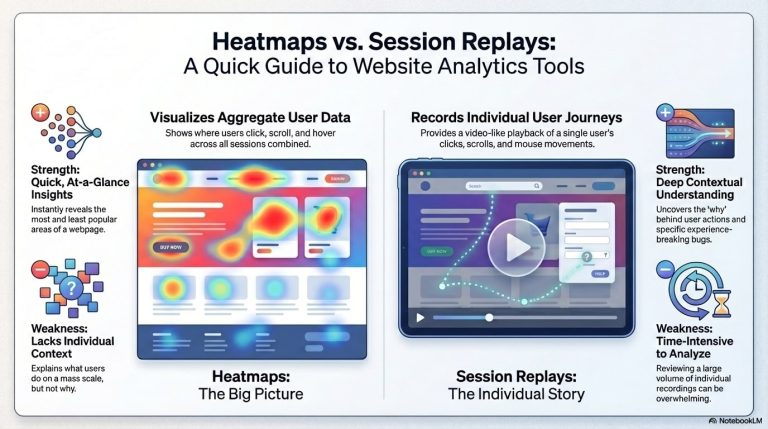
Utilize tools like heat maps and user session recordings to observe where users struggle during the checkout process. Record common frustrations and drop-off points.
3. Gather Customer Feedback
Send out surveys or use pop-up questionnaires post-purchase to collect insights from customers about their checkout experience.
4. Compile a 25-Point Checklist
This checklist serves as your auditing tool, helping you focus on specific aspects of the checkout process that may contribute to friction.
25-Point Checkout Friction Checklist
| Checklist Item | Status (Yes/No) | Notes |
|---|---|---|
| Is the checkout process easily accessible from the cart? | ||
| Are there too many steps in the checkout process? | ||
| Is there a guest checkout option available? | ||
| Are shipping costs transparent before the final step? | ||
| Is the payment process secure and clear? | ||
| Are there multiple payment options provided? | ||
| Is the website mobile-optimized? | ||
| Are mandatory fields clearly indicated? | ||
| Are error messages user-friendly and easy to understand? | ||
| Can users easily edit their cart contents? | ||
| Is there clear feedback on form submission success or failure? | ||
| Do you display trust signals (like security badges)? | ||
| Is the checkout page fast-loading? | ||
| Is the layout of the checkout page user-friendly? | ||
| Are there clear instructions or guidance throughout? | ||
| Are errors highlighted in real-time as users fill out the form? | ||
| Is there an option to save the cart for later? | ||
| Do you use auto-fill for address fields? | ||
| Do you offer a clear returns policy during checkout? | ||
| Is there a contact method readily available for support? | ||
| Is there a review of order details before final submission? | ||
| Is the language clear and free of jargon? | ||
| Are there social login options available? | ||
| Does the site provide an order tracking feature? | ||
| Is there an FAQ section to address common concerns? | ||
| Is the website secure and compliant with regulations (e.g., GDPR)? |
5. Implement Changes Based on Findings
After completing the audit, it’s time to make informed decisions. Prioritize changes based on the impact and ease of implementation. Test each change to see if it improves the checkout experience.
Pros and Cons of Checkout Friction Audits
Advantages
- Improves User Experience: A smoother checkout can significantly enhance customer satisfaction.
- Reduces Cart Abandonment: Identifying and addressing friction points can lower the cart abandonment rate.
- Boosts Conversion Rates: A user-friendly checkout process translates to an increase in completed purchases.
- Provides Valuable Insights: An audit can reveal the voice of the customer and indicate future improvements.
Disadvantages
- Time-Consuming: A comprehensive audit may require considerable time and effort.
- Resource-Intensive: Businesses may need to allocate resources or hire experts to conduct the audit.
- Potential Resistance: Stakeholders may resist changes due to fear of disruption in the current process.
- Immediate Implementation Challenges: Changes based on audit findings may not yield instant results.
Common Mistakes in Checkout Friction Audits
- Ignoring Mobile Users: Many users shop on mobile devices; neglecting mobile experience can lead to losing significant sales.
- Not Testing Changes: Implementing changes without adequate testing can worsen the experience.
- Focusing Only on Checkout: Friction can originate from earlier stages, such as product selection or cart addition.
- Overlooking Analytics: Failing to review analytics before and after might lead to missed insights.
Wrapping Up the Checkout Friction Audit Process
A checkout friction audit is a crucial step toward optimizing your e-commerce platform. By carefully examining and addressing issues within the checkout process, you can enhance user satisfaction, reduce abandonment, and ultimately drive sales.
Utilizing the 25-point checklist outlined above will guide your efforts in identifying friction points. Remember that continuous monitoring and improvement will ensure your checkout process remains user-friendly as trends and technologies evolve.
Final Checklist Reminder
| Checklist Item |
|---|
| Is the checkout process easily accessible from the cart? |
| Are there too many steps in the checkout process? |
| Is there a guest checkout option available? |
| Are shipping costs transparent before the final step? |
| Is the payment process secure and clear? |
| Are there multiple payment options provided? |
| Is the website mobile-optimized? |
| Are mandatory fields clearly indicated? |
| Are error messages user-friendly and easy to understand? |
| Can users easily edit their cart contents? |
| Is there clear feedback on form submission success or failure? |
| Do you display trust signals (like security badges)? |
| Is the checkout page fast-loading? |
| Is the layout of the checkout page user-friendly? |
| Are there clear instructions or guidance throughout? |
| Are errors highlighted in real-time as users fill out the form? |
| Is there an option to save the cart for later? |
| Do you use auto-fill for address fields? |
| Do you offer a clear returns policy during checkout? |
| Is there a contact method readily available for support? |
| Is there a review of order details before final submission? |
| Is the language clear and free of jargon? |
| Are there social login options available? |
| Does the site provide an order tracking feature? |
| Is there an FAQ section to address common concerns? |
| Is the website secure and compliant with regulations (e.g., GDPR)? |
Taking actionable steps based on your findings will set you on a path toward a more efficient, user-friendly checkout process, designed to convert casual browsers into loyal customers.