URL Strategy in WordPress: Slugs, Pagination, and Trailing Slashes
TL;DR: A well-structured URL strategy in WordPress is crucial for SEO and user experience. This guide covers essential elements like slugs, pagination, and trailing slashes, providing practical examples and common pitfalls to avoid. By following the outlined steps, you can optimize your website’s URLs for better search engine rankings and usability.
Understanding how to effectively manage your URL structure in WordPress can significantly enhance both your site’s visibility and user engagement. This article delves into the key components of URL strategies, including how to create effective slugs, manage pagination, and handle trailing slashes. With practical examples and a checklist, you’ll be well-equipped to refine your WordPress URLs.
Understanding the Importance of URL Structure in WordPress
The URL structure of your website is one of the first things search engines and users notice. A clear, logical URL not only helps in SEO but also improves user experience. Here are some key reasons why URL structure matters:
- SEO Benefits: Search engines favor clean, descriptive URLs.
- User Experience: A readable URL can enhance click-through rates.
- Link Sharing: Simple URLs are easier to share and remember.
Key Concepts of URL Structure in WordPress
Before diving into the specifics, it’s important to understand several key concepts related to URL structures:
- Slug: The part of the URL that identifies a particular page on your site in a human-readable format.
- Pagination: The process of dividing content into multiple pages, often used in blogs and archives.
- Trailing Slash: A format that may or may not be included at the end of a URL, affecting how the URL is perceived.
Step-by-Step Guide to Creating Effective URL Slugs
Creating effective slugs is a fundamental aspect of URL strategy. Follow these steps to ensure your slugs are optimized:
- Keep it Simple: Use clear, concise words that describe the content.
- Use Hyphens: Separate words with hyphens instead of underscores for better readability.
- Avoid Stop Words: Eliminate common words like “and,” “the,” or “of” unless necessary.
- Use Lowercase Letters: Stick to lowercase to avoid confusion and potential redirects.
Practical Examples of Optimized URL Slugs
Here are some examples to illustrate the difference between poor and optimized slugs:
| Poor Slug Example | Optimized Slug Example |
|---|---|
| example.com/post?id=123 | example.com/2023/03/wordpress-url-strategy |
| example.com/blog/2023/03/12/hello-world | example.com/blog/hello-world-what-is-wordpress |
Checklist for Creating Effective URL Slugs
- Use clear and concise language.
- Incorporate target keywords for SEO.
- Avoid special characters and unnecessary punctuation.
- Keep the slug length manageable.
Quick Exercise on Crafting Slugs
Try creating optimized slugs for the following titles:
- “How to Boost Your SEO with WordPress”
- “Understanding WordPress Plugins: A Comprehensive Guide”
- “The Ultimate Guide to WordPress Themes and Customization”
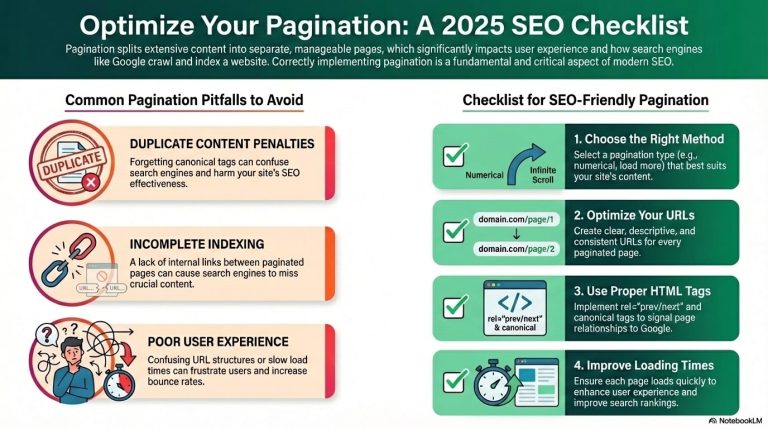
Best Practices for Managing Pagination in WordPress
Pagination allows you to break down extensive content into manageable sections. Proper management of pagination is essential for both usability and SEO:
- Use Numeric Pagination: Implement numbers in your pagination URLs for clarity (e.g., /page/2).
- Canonical Tags: Use these to indicate the preferred version of your pages to search engines.
- Consider Infinite Scroll: For blogs or archives, infinite scroll can enhance user experience, but ensure proper indexing.
Practical Examples of Pagination URLs
Here are examples of effective and ineffective pagination URLs:
| Poor Pagination URL | Optimized Pagination URL |
|---|---|
| example.com/blog?page=2 | example.com/blog/page/2 |
| example.com/articles/index.php?page=3 | example.com/articles/page/3 |
Checklist for Pagination Management
- Ensure URLs are user-friendly and descriptive.
- Implement canonical tags to avoid duplicate content issues.
- Test pagination links regularly for functionality.
Quick Exercise on Pagination
Create pagination for a hypothetical blog with 15 posts. How would you structure the URLs for pages 1 to 3?
Exploring the Role of Trailing Slashes in URLs
The trailing slash at the end of a URL can have varying implications depending on your website’s configuration. Here’s what you need to know:
- Consistent Use: Decide whether to use trailing slashes consistently across your site.
- Redirects: Configure your server to redirect URLs with and without trailing slashes to avoid duplicate content.
- User Preference: Consider user expectations; some may type URLs with or without slashes.
Practical Examples of Trailing Slashes
Observe the difference between URLs with and without trailing slashes:
| URL without Trailing Slash | URL with Trailing Slash |
|---|---|
| example.com/about | example.com/about/ |
| example.com/contact | example.com/contact/ |
Checklist for Handling Trailing Slashes
- Decide on a standard format for your site.
- Set up 301 redirects to maintain SEO value.
- Test for consistency across all pages.
Quick Exercise on Trailing Slashes
Review your website’s URLs. Are you using trailing slashes consistently? Document any discrepancies you find.
Avoiding Common Mistakes in URL Strategy for WordPress
While developing your URL strategy, be mindful of these common mistakes:
- Overly Complex URLs: Avoid using lengthy URLs with unnecessary parameters.
- Neglecting Redirects: Failing to set up redirects for old URLs can harm your SEO.
- Ignoring Analytics: Not tracking URL performance can lead to missed opportunities for optimization.
- Inconsistent Slugs: Using different formats for slugs can confuse users and search engines.
Checklist for Avoiding URL Strategy Mistakes
- Regularly audit your URLs for clarity and consistency.
- Implement redirects for any URL changes.
- Monitor analytics to assess URL performance.
Quick Exercise on Identifying Mistakes
List at least three URLs from your site that could be improved based on the common mistakes discussed. Suggest how to optimize them.
Final Thoughts on Optimizing Your WordPress URL Strategy
Crafting a strategic approach to URLs in WordPress can significantly impact your site’s SEO and user engagement. By implementing best practices for slugs, pagination, and handling trailing slashes, you can create a user-friendly and search-engine-friendly website.
Frequently Asked Questions about WordPress URL Strategy
What is a slug in a URL?
A slug is the part of the URL that identifies a specific page in a readable format. It’s typically derived from the page title.
How should I handle pagination in WordPress?
Use descriptive URLs with numbers for pagination and implement canonical tags to manage duplicate content effectively.
Are trailing slashes important in URLs?
Yes, trailing slashes can affect how URLs are interpreted by servers and search engines. Consistent usage is key to avoiding duplication.
What are some common URL mistakes to avoid?
Common mistakes include overly complex URLs, neglecting redirects, and inconsistent slug formats.
How can I test my URLs for SEO effectiveness?
Utilize analytics tools to monitor URL performance, track click-through rates, and assess user engagement with each URL structure.